Offboarding Exclaimer without mail-flow residue
A leaver and customer-exit playbook for Exclaimer, covering subscription users, sender data, server-side mail flow, Microsoft 365 uninstall work, subscription cancellation, and proof that mail no longer routes through Exclaimer.
Exclaimer sits in a sensitive place: brand, legal text, user data, and in server-side deployments, mail flow. A sloppy exit can leave a former technician with portal access or leave Exchange Online routing mail to a service the customer no longer pays for.
Two different removals
| Removal | What changes | Who can do it |
|---|---|---|
| Remove a subscription user | The person can no longer sign in to the Exclaimer portal for that subscription. | Subscription Owner or User Manager. Admins can do most things in the portal, but adding and removing users is reserved for Owner and User Manager. |
| Remove a signature sender | The user’s mail no longer receives a specific signature or falls out of signature scope. | Depends on the signature and sender-management model. |
Do not confuse those. A former MSP technician is a subscription-user problem. A customer leaver is usually an IdP and sender-data problem. A customer exit is mail flow, connector, app grant, subscription, and evidence work.
The customer-exit sequence
flowchart TD
    Start[Customer exit approved]
    Start --> Evidence[Download audit and<br/>subscription evidence]
    Evidence --> Disable[Disable routing<br/>or set safe bypass]
    Disable --> Verify[Send real test mail<br/>and inspect headers]
    Verify --> Remove[Remove connectors,<br/>rules, apps, domain]
    Remove --> Access[Remove portal users<br/>and reseller access]
    Access --> Billing[Cancel, transfer,<br/>or document subscription]
Runbook
Freeze signature changes
Stop template edits, sender-rule changes, Brand Kit changes, and campaign banners for the customer. Keep emergency mail-flow work in the change ticket, but do not let marketing changes overlap the exit.
Export the evidence
Download the Audit Log if the plan exposes it. Capture subscription owner, user list, deployment method, key signature rules, and the current Exchange Online or Google Workspace routing objects. Store the evidence in the PSA ticket.
Remove former MSP and customer portal users
In User Management, remove users who should no longer sign in. Confirm the remaining Owner and User Manager seats match the customer runbook before any cancellation or handover.
Handle customer leavers through the source of truth
If the user has left the customer, remove or disable them in Microsoft 365, Google Workspace, or the HRIS source. Then sync sender data. Use Sender Management or sender exceptions only for signature behavior that differs from the identity source.
Stop server-side routing in a controlled window
For a temporary stop, disable the Exclaimer transport rule. For a permanent exit, remove the transport rules and connectors. If the subscription is being uninstalled from Microsoft 365, also remove the related Entra apps and Exclaimer domain as the vendor guide describes.
The Microsoft 365 admin centre’s Integrated apps page is where the Exclaimer Cloud for Outlook add-in is removed. Once you click Remove, the page shows progress and a confirmation:
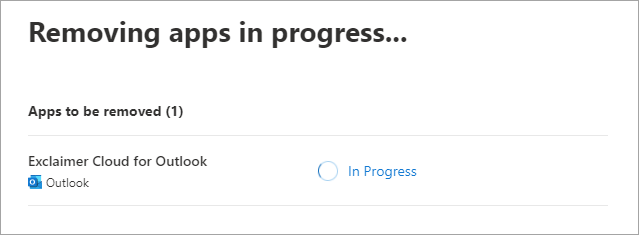
Removal kicks off and the row shows 'Removing'. Wait for completion before assuming any other cleanup step has worked. 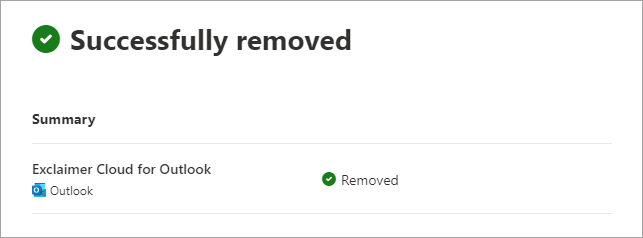
A clean removal shows the success state. If a row still says 'In progress' after a few minutes, that's a Microsoft retry case, not an Exclaimer config problem. Verify with real mail
Send internal and external test messages from an in-scope sender. Confirm the message does not route through Exclaimer, no Exclaimer signature appears, and headers show the expected Microsoft 365 or Google Workspace path.
Close subscription and billing
Only the subscription Owner can cancel an active Exclaimer subscription. Trial subscriptions expire instead of being canceled. If the customer keeps Exclaimer and the MSP exits, document the Owner handover rather than canceling.
When Tester and real mail disagree
This is the quick helpdesk bridge that was missing from the earlier course:
| Tester result | Real mail result | Likely cause | Next move |
|---|---|---|---|
| Signature applies | No real signature | Mail did not route through Exclaimer. | Check transport rule, connector, content-compliance rule, and deployment path. |
| Signature does not apply | No real signature | Sender, recipient, folder, or exception rule does not match. | Fix rule design or sender data. |
| Signature applies | Wrong real signature | Multiple signatures or folder order conflict. | Use rule order and folder processing checks. |
| Signature applies in a reply chain, then stops | Thread contains Exclaimer anti-duplication marker. | Escalate with Diagnostic Logs or support evidence. |
What this is NOT
- Not a mailbox-deletion process. Microsoft 365 or Google Workspace owns mailbox and identity offboarding.
- Not a reason to hardcode leavers into exclusions. Fix the identity source unless the exception has a documented business owner.