Multi-tenant administration patterns
How the Printix Partner Portal sits above per-customer Printix Homes, the partner / reseller / tenant hierarchy, and the day-to-day moves an MSP operator makes across many customers.
The Beginner and Intermediate courses lived inside one customer’s Printix Home. This lesson is the layer above it: how an MSP runs Printix across many customers, what the Partner Portal does that the per-tenant Administrator doesn’t, and the architectural seams that decide whether a 50-customer practice is sustainable or chaotic.
The hierarchy in the Partner Portal
The Partner Portal exposes the layers as tabs across the top: Tenants, Resellers, Users, Dashboard. The Resellers tab shows the partner-of-partner relationships in real customer terms.
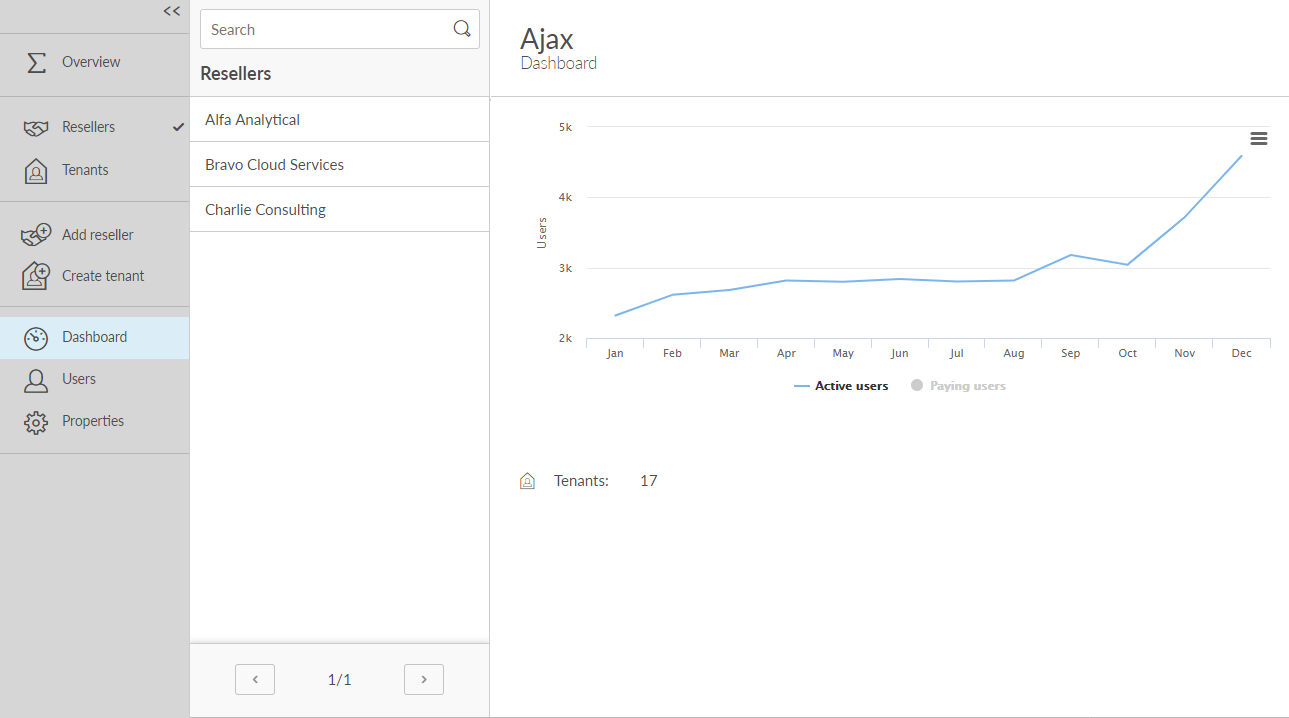
The partner is the MSP itself. Search, dashboard, billing roll up here. Cross-tenant search and tenant creation happen at this level.
A Reseller is an organisation under a Partner that holds its own subset of tenants. Useful when an IT distributor sells Printix to other MSPs.
Reseller-level subscriptions roll into the Partner master. Cancellation and invoice are per-Reseller, so the structure has to match the customer’s commercial reality.
Partner-only action. The Reseller then handles its own tenant creation under the Tenants tab in their scope.
Mismatched counts vs PSA records mean name drift or stranded tenants. A periodic reconcile catches it before billing does.
Three layers that matter:
- Partner. Top of the tree. The MSP itself. Lives at
partner.printix.net. From here, MSP staff create new tenants, search across them, and see partner-wide dashboard counters (Active users, Paying users, Tenants). - Reseller. A partner can add resellers underneath it: a different organisation that holds its own subset of tenants. Useful for tiered MSP arrangements, e.g. a parent IT services group with downstream regional MSPs. Most single-MSP shops never use the Reseller layer.
- Tenant. The customer’s Printix Home. Each tenant is a fully isolated multi-tenant slice: its own users, sites, networks, printers, queues, and audit history. Tenants don’t share state.
The Partner Portal in practice
The Partner Portal’s daily-use surface is small but critical:
| Function | Where | When you reach for it |
|---|---|---|
| Create tenant | Top of menu, “Create tenant” | New customer onboarding; pick the IdP (Microsoft Entra, Google, Email) and name the Printix Home subdomain |
| Search tenants | ”Tenants” + search box | Finding a specific customer to administer |
| Open Tenant in Printix Administrator | Click the tenant name | Drops you into the customer’s <name>.printix.net Administrator with your partner account |
| Add system manager to a tenant | Tenant properties, System manager tab | Adding an MSP technician’s email as a System manager on this customer |
| Manage subscription | Tenant properties, Subscription tab | Start the paid subscription, change billing, cancel |
| Move tenant to another partner | Documented procedure | When a customer moves between MSPs |
| Partner Portal Users | Top-level Users page | Manage who in the MSP can access the Partner Portal itself |
| Dashboard | Partner Portal Dashboard | Active users / Paying users / Tenants over time, exportable as XLSX or CSV |
The Partner Portal does NOT do per-tenant printer or queue work. To touch a customer’s sites, you click into their Tenant from the Portal, which lands you in their Printix Home Administrator. From there it’s the same UI as the Beginner-course tour.
The day-to-day operator pattern
sequenceDiagram
    participant T as MSP technician
    participant PP as Partner Portal
    participant PH as Customer Printix Home
    T->>PP: partner.printix.net
    Note over T,PP: Always start here, not in a customer URL
    T->>PP: Search "Acme"
    PP->>T: Acme Industries tenant in results
    T->>PH: Click tenant, lands in acme.printix.net
    Note over T,PH: Header reads "Acme Industries"<br/>Confirm before touching anything
    T->>PH: Make the change
    T->>PP: Back to Partner Portal for next customer
Three rules that come from running the model in anger:
- Start every shift in the Partner Portal. Bookmarking individual
customer.printix.netURLs and jumping straight in is how MSP technicians end up making changes in the wrong tenant. The Portal is the canonical entry. - Confirm the header in every tenant. Same rule as the Beginner-course Administrator tour, except now you’re crossing tenant boundaries multiple times per hour. The header reading is reflex.
- Per-tech accounts, never shared. Each MSP technician has their own Microsoft Entra (or Google, Okta, OneLogin) sign-in. Partner Portal Users page shows who has access; remove leavers there and in the IdP. Audit trails on tenant changes show the technician’s email; shared logins blow that up.
A worked customer-add: the Acme Industries onboarding
Acme is a new customer. Microsoft 365 anchored, single office, 40 staff. Plan from Partner Portal to first user printing:
Create the tenant
Partner Portal, Create tenant. Acme Industries. Identity provider: Microsoft Entra ID / Office 365. Printix Home subdomain:
acme-industries.printix.net. Decide trial or paid, attach the Acme contact as the initial system manager.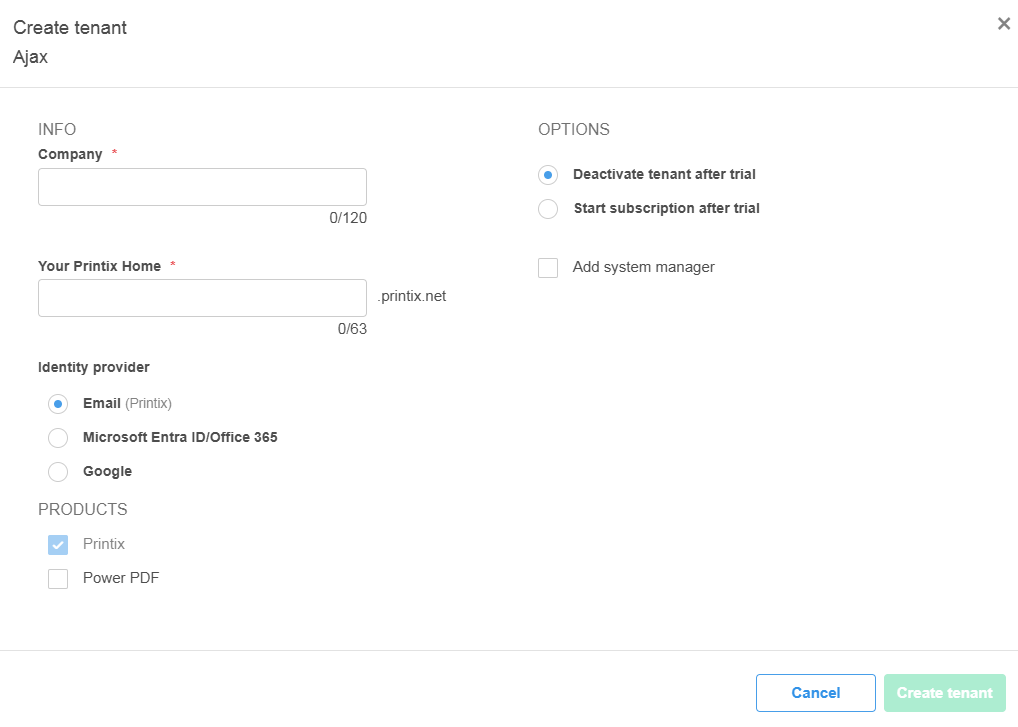
Add an MSP system manager
Tenant properties, System manager. Add the MSP onboarding tech’s email so they can administer the tenant directly without bouncing through the Partner Portal each time.
Hand off to the implementation pattern
Within Acme’s tenant, the work is the same as the Intermediate course’s deployment lesson: enable Microsoft Entra group sync, design Sites and Networks, configure authentication methods, deploy Printix Client via Intune, configure secure print defaults.
Set the partner-side trial-to-paid trigger
On Tenant properties, Subscription tab, set “Start subscription after trial” so the trial doesn’t lapse silently. If the customer needs more trial time, “How to extend a trial” is a Partner Portal action.
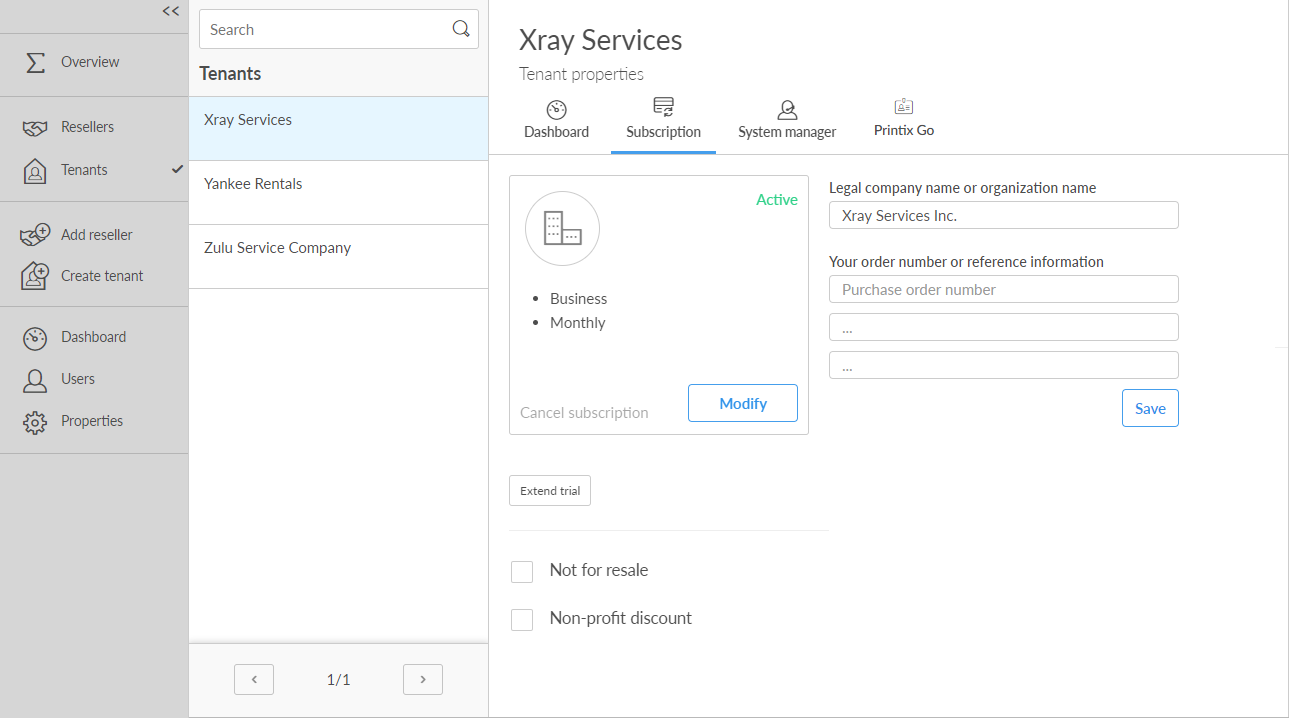
The handoff from Partner-Portal-level to tenant-level work is the seam that scales. Onboarding playbooks live at the Partner Portal layer. Customer-specific work (drivers, queues, groups, sites) lives inside the tenant.
Operator anti-patterns
Three patterns to avoid, each born of taking a shortcut:
| Anti-pattern | Why it’s tempting | What goes wrong |
|---|---|---|
| Shared MSP login per tenant | One account, one password, easier than provisioning per-tech access | Audit log shows “GenericMSP” on every change; nobody knows who broke what |
| Tenant URL bookmarks instead of Partner Portal | Faster click | Wrong-tenant changes; missing tenants when a new customer is added; no visibility into Subscription state |
| MSP staff added to customer’s Microsoft Entra group | Lets the tech “see” the tenant via group sync | The right tool is Partner Portal access plus a tenant-level System manager seat. (Operator-experience anti-pattern, not vendor doc; the surface symptom is audit-trail confusion and ambiguity over whether the MSP user counts toward the customer’s billed-user total.) |
What this is NOT
- Not the same as the customer’s own Site / delegation model. The customer’s Site manager role (Intermediate course’s fourth lesson) scopes a customer-side person down to part of their own tenant. Partner Portal scopes an MSP-side technician across multiple tenants.
- Not a feature for cross-tenant data viewing. Each tenant’s Sites, printers, users, and history are isolated. The Partner Portal Dashboard shows aggregates (Active users count, Tenants count) but you can’t, for example, run a Power BI report across multiple customers from the Partner Portal layer. That’s a custom-API job (covered in the integration-and-automation lesson).
- Not a billing console for end customers. A customer’s own subscription state (extend trial, change credit card, cancel) appears both inside the tenant’s Subscription page and at the Partner Portal layer. The Partner Portal is the operator’s view; the tenant view is what an internal customer admin sees.