Policy and exclusion design without blind spots
Where Huntress is policy-driven and where it isn't, the inheritance model for Managed Defender exclusions, and a discipline for adding exclusions that don't undo the protection you're paying for.
The first thing to know about Huntress at the engineer level: most of it is not policy-configured by the partner. The SOC’s detection logic, the Process Insights ruleset, the ITDR detection set, those are managed by Huntress. What the partner does configure, deliberately, are the Managed Antivirus settings (Defender policies) and the exclusions across the estate. Get those right and the detection layer above them works as intended. Get them wrong and the SOC is investigating noise generated by your own configuration.
What’s policy-driven, what isn’t
| Concern | Who owns the configuration |
|---|---|
| EDR / Process Insights detection logic | Huntress SOC (not partner-configurable) |
| ITDR detection logic | Huntress SOC (not partner-configurable) |
| Managed Defender policy (Audit vs Enforce, settings) | Partner, with Huntress Recommended Defaults to inherit |
| Managed Defender exclusions (paths, processes, extensions) | Partner |
| Ransomware Canary file rollout | Partner (on by default; can be disabled) |
| Host isolation triggers and bulk-isolate actions | Partner can act; SOC can also isolate during investigation. Per-host isolation is on the Agent overview; bulk-isolate (whole-Organization) is gated to Account-level Admin and is the right tool when the SOC’s escalation describes an outbreak across multiple endpoints. |
| Process Insights detections themselves | Huntress (raised as Incident Reports) |
The mental model: the partner controls Defender’s posture (what to scan, what to leave alone) and the on-endpoint surface (canaries, isolation), and the SOC sits on top of all of that watching for the things Defender misses or that span endpoints.
The exclusion inheritance model
Managed AV exclusions inherit at three levels, broadest at the top:
flowchart LR
    Acc["<b>Account</b><br/>applies to every customer"] --> Org["<b>Organization</b><br/>one customer's additions"] --> End["<b>Endpoint</b><br/>per-host overrides"]
Three levels, three jobs:
- Account. Genuinely cross-customer needs. The MSP’s RMM agent path, perhaps a backup product the MSP standardises on. Anything here applies to every customer.
- Organization. Customer-specific applications. The bookkeeping suite Able Moose runs but Riverbend Legal doesn’t.
- Endpoint. One-off, surgical, time-bounded carve-outs. A developer machine running an unsigned binary while we sort out an installer.
Exclusions apply within roughly an hour, often faster. When two levels overlap, the more specific one wins.
The Defender exclusion modal is the one place new mistakes get made. The screenshot below is the Endpoint-level form (the title says so); the Organization and Account equivalents look almost identical, except they target a customer or the whole MSP instead of a list of endpoints. Path / Process / Extension is the type selector across all three.
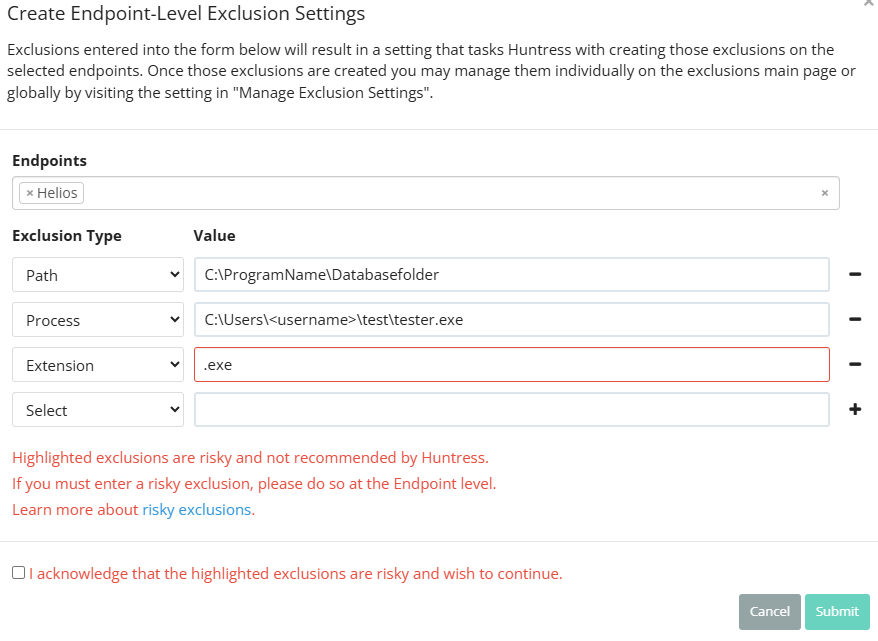
The Account- and Organization-level modals have nearly the same fields but no Endpoints picker, and they apply much more broadly. Read the title before you start typing.
Multi-select; one or many endpoints. The narrowest scope on offer — pair it with a specific path or process for a surgical carve-out.
Process is the narrowest. Path is mid-broad (a directory and everything under it). Extension is the broadest, almost never the right answer.
Highlighted rows match Huntress’s risky pattern (broad path, common process, common extension like .exe). The portal lets you proceed, but only via the acknowledgement below.
Forced tick when the type / scope combination is risky. A deliberate action, not a click-past — paste the ticket reference into the description field on the parent exclusion list afterwards.
Exclusion takes effect within roughly an hour. Confirm by re-running the Defender scan that produced the original detection.
Three categories, one risk model
Per the Exclusions article, Defender exclusions break into three types:
| Type | What it excludes | Risky when |
|---|---|---|
| Path exclusion | A directory and all files beneath it | Excluding C:\Users\<user>\Documents or C:\Temp (commonly-targeted user paths). |
| Process exclusion | A specific process executable | Excluding winword.exe, outlook.exe, anything an attacker would gladly use as a host. |
| Extension exclusion | All files of an extension globally | Excluding .zip, .exe, .dll, .xlsx (attacker-friendly file types). |
The dashboard prompts to acknowledge risk when an exclusion looks dangerous. That prompt is the moment to ask “do we need this, or is it a vendor’s lazy default we should push back on?”
A discipline for adding an exclusion
Confirm the alert is the exclusion problem
Before excluding anything, read the Defender detection or the Huntress incident report. If the alert is on a legitimate business app, the exclusion is the right tool. If the alert is on something the user doesn’t recognise, you are about to silence a real detection. Don’t exclude.
Be as specific as possible
A specific path beats a parent directory. A specific process executable beats an extension. Lean toward Endpoint or Organization scope; only push to Account when three or more customers genuinely need the same exclusion.
Document why
The exclusion description is the breadcrumb future-you reads when wondering “why is this here?” Reference the ticket, the customer, the vendor application, the date.
Set a review date if it's risky
A risky exclusion (broad path, common process, common extension) goes on the quarterly review list. If the customer no longer needs the application that justified it, the exclusion is dead weight that increases attack surface.
Audit vs Enforce mode
Defender management has two modes per the Recommended Default Settings article:
- Audit Mode. Huntress reports on the current Defender posture but does not modify anything. New endpoints come into the platform with their existing settings recorded.
- Enforce Mode. Huntress applies the policy (Recommended Defaults at Account level, plus any partner-set overrides). New endpoints inherit the active policy.
The partner-side decision: most MSPs run Enforce Mode in production so policy is consistent across the customer base. Audit Mode is useful during onboarding (you can see what’s already configured before you change anything) and for customers with unusual local configurations that need preservation while you negotiate the change.
A worked decision: Able Moose Accounting (mid-market)
Able Moose has grown to 120 staff across three offices. Their bookkeeping suite drops a database file in C:\AbleMooseAcct\db\ and Defender keeps quarantining a recompile of one of its DLLs.
What this is NOT
- Not a way to silence Process Insights detections. Defender exclusions affect Defender. Process Insights, the SOC-side analysis, doesn’t run from a partner-configurable exclusion list. If a Process Insights detection is wrong, that’s a SOC Support conversation, not an exclusion.
- Not the same as ITDR exclusions. ITDR licensing is per active billable user (those Microsoft itself bills for). Per the ITDR FAQ, you can’t exclude a user from ITDR licensing for security reasons; the model treats every user as a potential attack vector.