Multi-tenant architecture. MSP dashboard and sub-orgs
How DNSFilter's MSP dashboard, sub-organisations, and whitelabel work together, what inherits, what doesn't, and the RBAC anti-patterns that cost MSPs incidents.
DNSFilter’s multi-tenant model is purpose-built for MSPs and resellers. There’s a top-level MSP organisation, and under it, child organisations (DNSFilter calls them “sub-orgs”) representing each customer. The MSP dashboard provides a whitelabeled view of the whole estate plus per-customer drill-down. Getting the architecture right at the top means everything beneath scales cleanly.
The shape
The MSP dashboard is the entry point. The Organizations sidebar lists every sub-org, and the tenant header confirms which scope you’re editing.
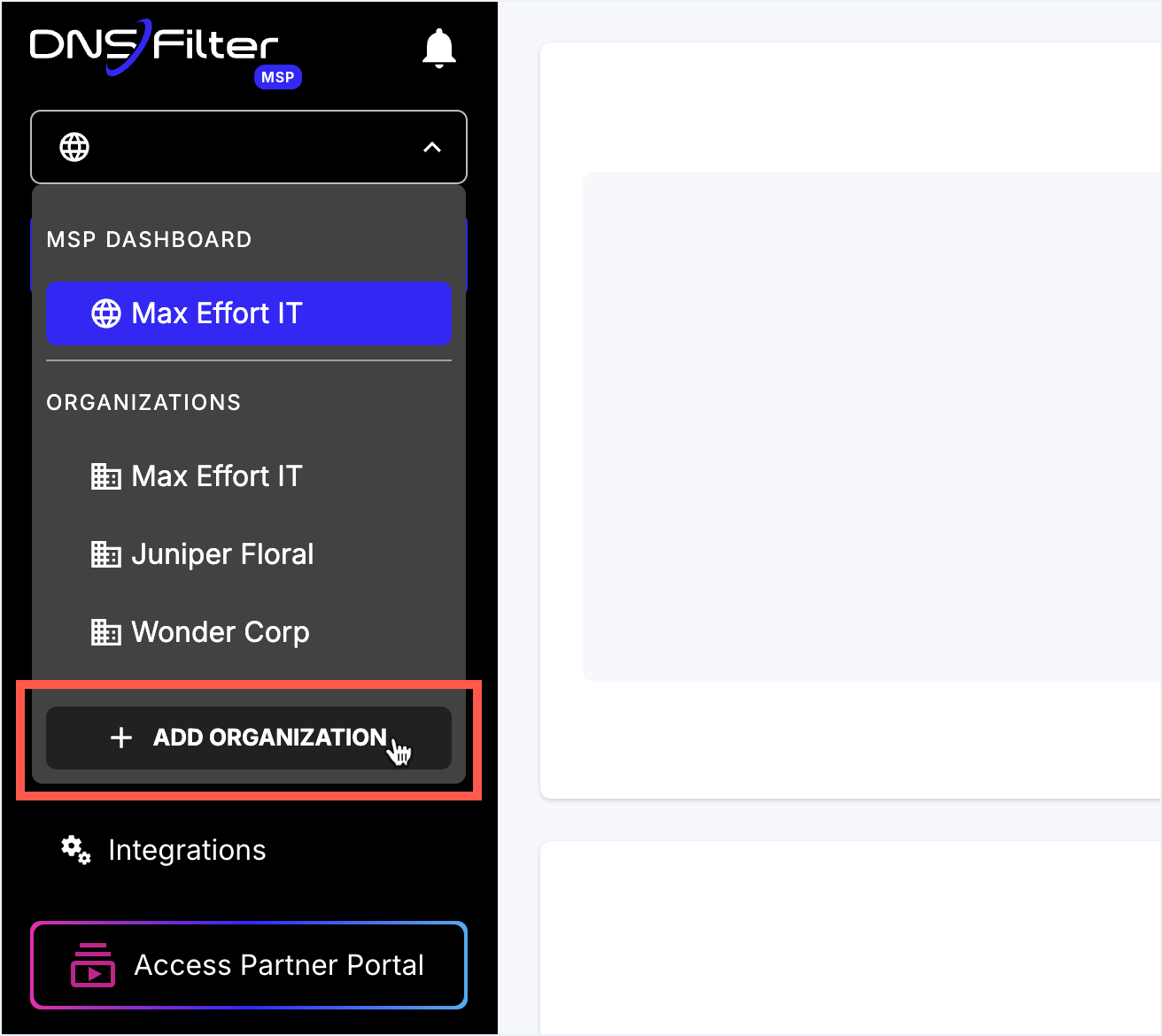
The list shows every sub-org the MSP manages. Clicking flips the dashboard’s tenant context.
Owner or Super Admin only. Plan tier is selected per-sub-org at creation; subscriptions roll into the MSP master.
Settings made under the globe affect Global Policies and Global Universal Lists. Clicking a sub-org swaps the icon.
Type-ahead search of every managed org. Useful when a frontline ticket only names the customer, not the org slug.
Always verify this header before saving. The single most-common MSP mistake is editing the wrong sub-org.
Key facts from DNSFilter’s own documentation:
- The MSP partner account type is selected at signup (“Managed Service Provider” or “Internet Service Provider”). Multi-tenancy isn’t retrofittable, if you started as a single Organization, you’d need DNSFilter’s help to migrate.
- MSP Whitelabel produces a custom dashboard subdomain (e.g.
filtering.yourdomain.com) and brand-replaces alert emails so they appear to come from the MSP, not from DNSFilter. - MSPs can manage all client Sites from the top MSP account, recent platform updates centralised Site management with enhanced search and filtering across customers.
- Subscription plans are selected per sub-org, in real time.
What’s per-sub-org and what’s not
| Object | Where it lives | What that means |
|---|---|---|
| Network Sites | Per sub-org | A Site only matches queries from that sub-org’s recognised IPs. They never collide between siblings. |
| Roaming Clients | Per sub-org | Each agent is provisioned against one sub-org. |
| Filtering Policies | Per sub-org | Policies don’t inherit between sub-orgs; if the MSP wants the same policy across customers, copy it explicitly (and document the convention). |
| Allow / Block lists | Per policy or per sub-org Universal | Per-sub-org Universal Allow / Block applies to everything in that sub-org and overrides at sub-org scope. The mechanics here are covered in the per-ticket lesson; this lesson focuses on the MSP layer. |
| Global Universal Lists at the MSP layer | Under MSP → Global Policies | Apply across every sub-org the MSP manages. They behave like a per-policy Universal List but at MSP layer: an entry on a Global Universal Block hits every customer. Per-sub-org Universal Lists still exist below, with sub-org scope. Use Global Universal Block for MSP-wide bad-domain knowledge; reserve Global Universal Allow for cross-customer MSP tooling only. |
| Block Pages | Per sub-org | Whitelabel sets the default; sub-orgs can override their own logo, name, email. |
| Users (admins) | Per sub-org and at the MSP layer | MSP staff authenticate at the MSP level. Customer admins are scoped to the customer’s sub-org only, never to siblings. |
Three RBAC anti-patterns
1. Customer admins with cross-sub-org access
It’s tempting to grant a customer-side IT lead “Super Admin on the MSP account” so they can self-serve. That gives them visibility into sibling customers’ policies and Query Log, a confidentiality breach and a regulatory problem in a heartbeat. Customer admins go in the customer’s sub-org, full stop.
2. Shared MSP credentials
A single shared MSP account login among ten techs means the Policy Audit Log shows “GenericAdmin changed the policy” instead of “Sarah changed the policy.” When the next change goes wrong, nobody knows who made the previous one. Always per-tech accounts; SSO if the MSP has an IdP.
3. Forever-Owner
DNSFilter’s Owner role is the only one that can cancel the organisation’s DNSFilter account. Two operational rules:
- The Owner must be a service account or an executive seat, not “whoever signed up first.” When that person leaves the MSP, you don’t want the account hostage.
- DNSFilter recommends assigning at least one Super Admin role to a shared email so the team has a way back in if SSO keys expire or an account is locked out, this is the documented escape hatch, not “everyone keeps their personal password as a fallback.”
Below Owner, DNSFilter’s role structure is layered. The names worth knowing at the Advanced level:
| Role | Where it applies | What it can do |
|---|---|---|
| Owner | Any organisation | Full permissions plus the only role that can cancel the account. |
| Standard Org Super Admin | A regular sub-org | Full permissions for that org: policies, deployments, integrations, billing, role assignment. Multiple Super Admins per org is supported; one user can be Super Admin in multiple orgs. |
| MSP Org Super Admin | The MSP layer | Same as Standard Super Admin plus the ability to create and delete sub-orgs. Exists only at the MSP level. |
| Standard Org Admin | A regular sub-org | Manages policies, Universal Lists, deployments, integrations, reporting, the Policy Audit Log. View-only on org settings (SSO, 2FA) and billing. |
| MSP Org Admin (all orgs) | The MSP layer | Manages policies / lists / deployments across orgs, integrations, billing, reporting, audit. Adds new orgs but cannot remove. View-only on MSP-level SSO / 2FA. |
| Policies Only | Either layer | Edits existing Filtering Policies; view-only on the rest. |
| Read Only | Either layer | View-only across the board. Hidden tabs include Integrations and Tools → Data Export. |
A practical implication: an Admin cannot elevate their own role to Super Admin, that kind of change requires an existing Super Admin or Owner. Build that into your account-rotation process.
What partner access patterns look like
Three patterns recur in the field:
| Pattern | Who | Where to put them |
|---|---|---|
| MSP-managed (default) | Customer hands over filtering entirely. | All admins are MSP staff at the MSP layer. Customer has zero accounts. |
| Co-managed | Customer’s own IT does some self-service (Allow list approvals). | Customer-side users with Admin or Policies Only role on the customer’s sub-org. MSP staff at MSP layer. |
| Customer-managed with MSP fallback | Customer drives everything; MSP is a help-of-last-resort. | Customer staff as Owner / Super Admin in the sub-org. MSP retains a Super Admin seat for emergency. |
Pick deliberately at onboarding; document the choice in the customer’s PSA. Drift between patterns happens because nobody noticed which they signed up for.