Running a Security Awareness Training campaign
How Huntress SAT divides Learners, Assignments, and Phishing campaigns; the allowlisting prerequisite; the baseline-then-trend metrics that make a campaign defensible to the customer.
The SAT module (acquired from Curricula and now branded as Huntress Managed Security Awareness Training) is a separate admin platform at mycurricula.com from the main Huntress portal. The vocabulary is its own. A technician running a campaign needs to know the building blocks, the prerequisite that bites everyone the first time, and the metrics that turn a campaign into a customer conversation worth having.
The vocabulary
Per the Managed SAT Terms and Definitions article:
| Term | What it means |
|---|---|
| Learner | A user enrolled in SAT. Same as a Huntress User on the platform side; called Learner in the SAT context. |
| Episode | An individual training video on a cybersecurity topic. The atomic learning unit. |
| Assignment | A scheduled package of episodes delivered to learners over a chosen period. |
| Group | A segment of learners. Can have its own content, access controls, and delivery options. |
| Department / Tag | Additional segmentation tools for assignments and phishing campaigns. A learner has one Department but can have multiple Tags. |
| Campaign | A scheduled phishing simulation against selected learners. |
| Compromised | A learner who interacted with the simulated phish to the final step (per the SAT Terms article, e.g. interacted with the landing page after clicking the link). Distinct from Clicked, which is the link-click step alone. |
Two of these matter most for design: Group (segmentation that controls what they get) and Tag (segmentation that controls how you slice reporting).
The allowlisting prerequisite, the one that bites everyone
Phishing simulations come from controlled IPs and domains. Customer mail security will quarantine them unless those IPs and domains are allowlisted. Per the Manage Phishing Campaigns article:
- The phishing IP and domain list lives under Settings -> Phishing -> Allowlisting in the SAT admin platform.
- You allowlist in the customer’s email client (Microsoft 365’s anti-spam policies, or whichever mail security they run).
- If the customer also has a third-party email security gateway (Mimecast, Proofpoint, etc.), allowlist there too.
A campaign launched without allowlisting produces ugly metrics: high “Blocked” status counts, low delivery, and a customer asking why they paid for the run. The first ten minutes of any new tenant’s first campaign go to confirming allowlisting end-to-end.
The baseline-then-trend metric model
The SAT Dashboard’s Overview page tracks two cohorts of metrics:
- Point-in-time: Active Learners, in-progress Phishing Campaigns, in-progress Assignments, Episode Completion (completed obligations / total).
- Last 30 days vs the previous 30: Compromised Learners count, Compromised Rate %, Campaign Report Rate %.
The Compromise Rate by Attempt chart is the chart that earns the SAT spend. It buckets learners by which attempt number they’re on (their first simulated phish, their second, their tenth). On the first attempt, the compromise rate is the customer’s baseline, what you’d expect from a population that’s never been trained. As learners cycle through attempts, the rate trends down. When a campaign with a tougher scenario spikes the rate back up, that’s the campaign that’s testing something genuinely new.
This is the discipline:
- Run the first campaign with a generic scenario to establish the baseline.
- Run subsequent campaigns with graduated scenarios, calendar-tied (tax season, payroll season, vendor-impersonation) and don’t compare apples to oranges in your reporting.
- Track Compromise Rate by Attempt over months, not by individual campaign.
- Pair each campaign with relevant Assignments so learners who fail get specific training, not a generic refresher.
Notification routes
Learners get notified by email by default. The Slack integration adds a second route. Per the Slack integration article:
- Learners’ email addresses must match between SAT and Slack.
- A SAT admin and a Slack admin together connect the integration.
- Notifications can go via Slack instead of email, or both. If no matching Slack user is found for a learner, SAT falls back to email.
Slack is not used for the phishing simulation itself. Per the article’s FAQ, simulated phishing only runs over email, since Slack is a closed environment with low real phishing volume.
A worked campaign: Able Moose Accounting (mid-market)
Able Moose has 120 staff and has never run an SAT campaign. The mandate is “establish baseline, ship a quarterly campaign cycle.”
Set up allowlisting
In Able Moose’s M365 anti-spam policy (or Defender for Office 365 if they have it), allowlist the SAT phishing IP and domains from the SAT Settings page. Confirm by sending a test simulation to a single internal admin and watching it land in the inbox.
Build the segments
Three Groups: All Staff, Finance Team, IT Admins. Tags for office location (Auckland, Sydney, Brisbane) so reports can be sliced by site. Department maps to internal HR data.
Run the baseline campaign
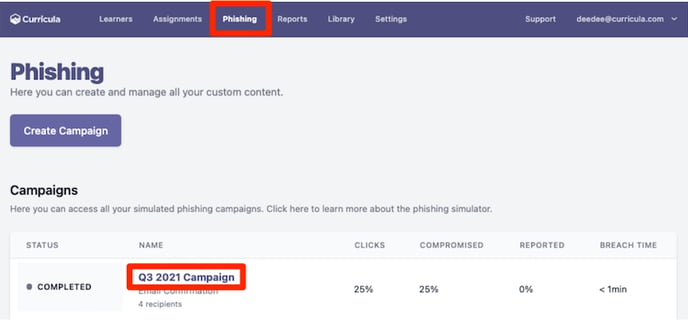
A generic credential-harvest scenario, all 120 learners in scope, 7-day delivery window. No matching assignments yet, you want a clean baseline.
Read the baseline
Compromise rate, click-through rate, report rate. Note specific learners who clicked, and which Department / Tag groups had higher rates. Don’t act yet beyond brief Finance and IT Admins on the result.
Plan the next two campaigns
A quarter-end finance scenario for Finance staff (Tag-targeted). A vendor-impersonation scenario for IT Admins. Pair both with relevant Assignments due before the run, so learners have the training fresh.
Report to the customer monthly
Compromise Rate by Attempt is the headline. Customer-facing reports include the trend, the campaigns run, and the assignments delivered.
The reporting cadence in the customer relationship
A common SAT pitfall is “we ran the campaign and never talked about it with the customer.” The reporting cadence that earns its keep:
| Cadence | Audience | Content |
|---|---|---|
| Per campaign | MSP internal | Campaign-specific report. Goes into the next monthly customer report. |
| Monthly | Customer primary contact | Compromise Rate by Attempt trend, campaigns run last month, what’s coming up. |
| Quarterly | Customer leadership | Multi-month trend, year-on-year if applicable, recommended adjustments. |
The Huntress monthly threat report (separate from SAT) covers EDR and ITDR; SAT reporting is a separate stream and, in most MSPs, owned by the same person who runs the customer business review.
Per the SAT FAQ, the platform is designed around learners as a population, not an enforcement mechanism. Per-learner click data is for training assignment, not for performance management; share that boundary explicitly when a customer asks for “a list of who failed” so you don’t lose the cooperation that makes future campaigns work.