What Printix is and where it sits
A six-minute mental model of Printix as cloud-native print management that replaces the on-prem print server with a workstation agent and a vendor cloud.
Printix replaces a customer’s on-prem print server with a cloud service plus a workstation agent. The print server, the driver share, the per-laptop driver chaos, all of that gets pushed up into a vendor-hosted serverless print stack. Kofax was renamed to Tungsten Automation in 2024; Printix kept its name and the product itself stays the same workhorse it always was: cloud-native print management aimed at Microsoft 365 and Google Workspace customers.
The problem this product solves
Print servers are where MSP support hours go to die. A typical small or mid-market customer ends up with at least one Windows Server VM whose only job is hosting print queues and shoving drivers down to laptops. The pain stack:
- Driver sprawl. Every printer model needs its own driver. Drivers go stale, conflict with Windows updates, and break in interesting ways on ARM laptops.
- Capacity and patching. The print server is a single point of failure that nobody wants to reboot during business hours, and it eats Windows Server licences.
- Roaming users. Hybrid workers off the LAN can’t reach the on-prem queue. Either they don’t print, or somebody plumbs a VPN tunnel just so they can.
- No release control. Confidential documents land in the output tray and sit there until somebody collects them. Or doesn’t.
Printix’s pitch from its own documentation: “Instead of print servers, use an automated print infrastructure.” The Printix Client on each computer talks to the Printix Cloud over HTTPS. “No on-premise servers and databases are required.” Drivers live in a global driver store and the right one downloads when a queue is added. Confidential jobs hold in secure release and only print when the user authenticates at the device.
That’s why an MSP puts Printix in a stack: it removes a Windows Server VM, gives the customer pull-printing without on-prem hardware, and centralises driver and queue management behind a web admin console.
How Printix works, one diagram
The vendor’s own architecture diagram covers the same ground in one picture: identity providers on the left, the Printix Cloud in the middle, the local agent and printer on the right, plus Capture as the scan-to-cloud sister feature.
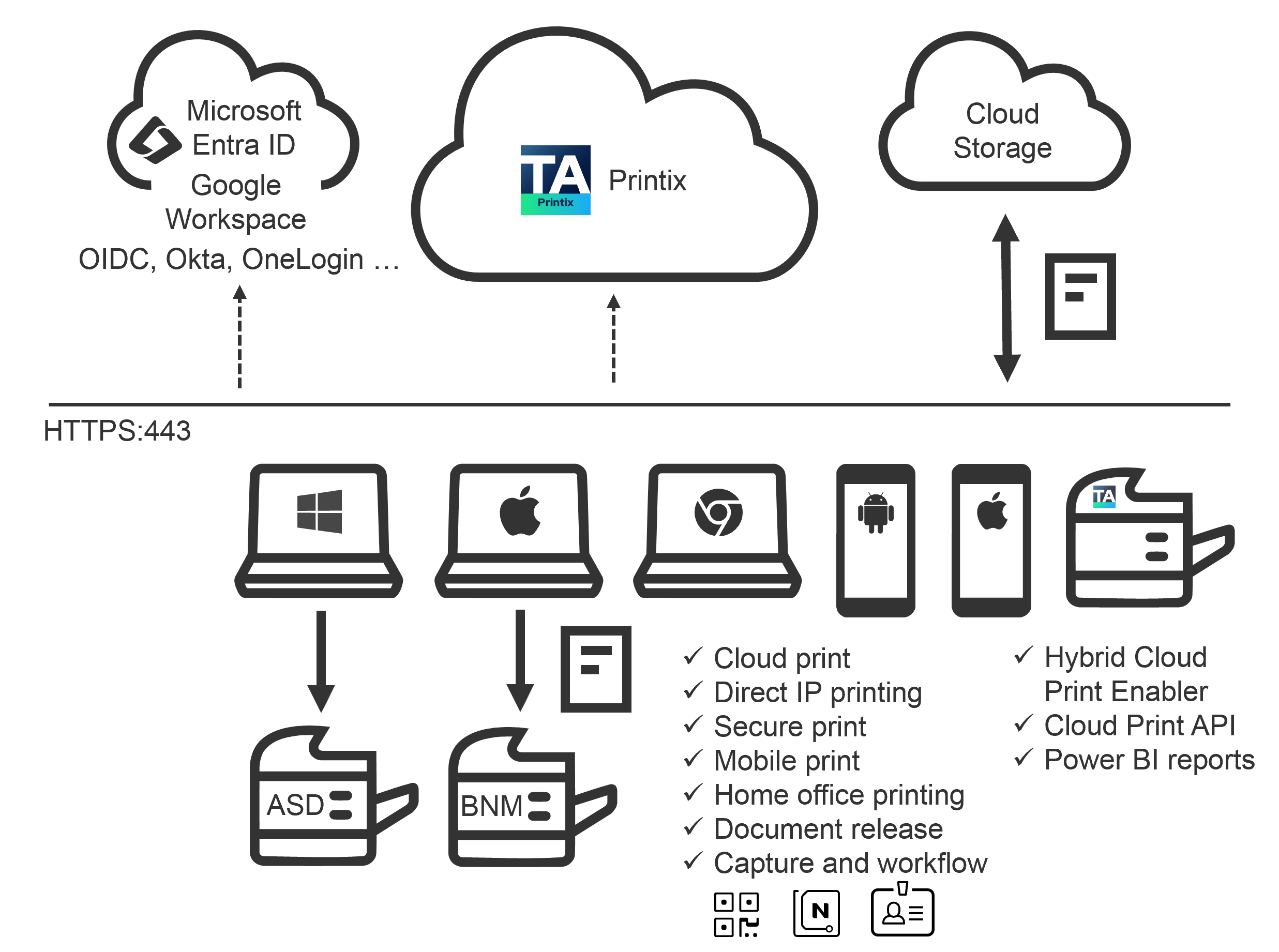
Microsoft Entra ID, Google Workspace, Okta, OneLogin, generic OIDC, Active Directory, or Sign in with email. Printix never stores the password; it trusts the IdP’s token.
Holds queues, drivers, sites, networks, users, and policy. The customer’s own infrastructure shrinks to printers plus laptops with the Printix Client.
First user to register a printer triggers a driver upload to the customer’s driver store. Subsequent users pull the matching driver from the store automatically.
Buffers print data locally, encrypted. Releases to the printer when the user authenticates at the device or via the Printix App.
Touchscreen app on supported MFPs. Card or ID-code-plus-PIN authentication; PIN-protected two-factor optional.
Scan to OneDrive, SharePoint, Google Drive, or a custom Connector via the same touchscreen. Out of scope here; named so the diagram parses.
Three things to hold from this picture:
- Print data stays local. The encrypted job lives on the user’s computer (or in the customer’s own cloud storage if configured). Printix Cloud orchestrates; it doesn’t proxy bytes to the printer.
- Printix Cloud holds configuration. Driver store, print queues, sites, networks, users, policies. That’s what the admin lives in.
- Identity is federated. Users sign in with Microsoft, Google, Okta, OneLogin, OIDC, Active Directory, or email. Printix doesn’t own the password.
Where Printix sits in the customer stack
Printix is not a security product, not an MFP brand, not a document management system. It’s a layer between the user and the printer that the rest of the stack delegates the print problem to.
| Layer | Owns | Printix’s relationship |
|---|---|---|
| Identity (Microsoft Entra ID, Google, Okta) | Who the user is | Printix federates to it for sign-in; never holds the password |
| Endpoint management (Microsoft Endpoint Manager, Jamf) | Pushing the Printix Client | Printix supplies the MSI / PKG; MEM does the install |
| Hardware (HP, Canon, Brother, Konica Minolta, Fujifilm, etc.) | The physical printer | Printix discovers it, drives it, optionally hosts Printix Go on its touchscreen |
| Document workflow (SharePoint, OneDrive, custom) | Where scans end up | Printix Capture delivers there |
A few names this diagram drops without defining them. Park these one-liners now; later lessons go deeper:
- Printix Go is the touchscreen app installed on supported MFPs. It handles card or PIN authentication at the printer.
- Printix Capture is the scan-to-cloud sister feature. Go terminals can scan to OneDrive, SharePoint, or Google Drive via the same touchscreen.
- Home Office printing lets remote users print to office printers via cloud queues; configured at the group level.
- Tree-O-Meter is the dashboard counter that estimates trees saved by 2-sided printing and uncollected pages, using a Sheets Per Tree conversion.
A worked example: Able Moose Accounting
Able Moose Accounting is a 15-person bookkeeping firm in one office. They have a single Microsoft 365 tenant, two admin staff, and four printers. Until last quarter they ran a Windows Server 2019 VM whose only job was hosting print queues. When that VM rebooted for Patch Tuesday, the receptionist couldn’t print invoices for two hours.
After the Printix rollout:
- Server gone. The Windows Server VM was decommissioned. One less Windows licence, one less reboot window.
- Drivers in the cloud. When a new starter joins, their laptop signs into the Printix Client and queues for the four office printers appear. No technician trip to the office.
- Confidential payroll. The finance manager prints to the reception MFP but the document only comes out after she taps her phone or her badge. No more “whose payroll is this?” stack on the printer.
This is the customer profile through the Beginner course. Riverbend Legal (small law firm) and Northwind Logistics (mid-market warehouse) appear later as foils when the scenario calls for compliance-strict or shift-work flavours.
What this is NOT
- Not Universal Print. Microsoft Universal Print is a similar idea from Microsoft, with narrower printer support and different licencing. The two can coexist (covered in the Advanced course’s hybrid-topologies lesson).
- Not on-prem-friendly. Printix talks HTTPS to its cloud. A customer fully air-gapped from the internet is not the customer for Printix.